

A shop window can change before the morning rush. A café can replace a lunch offer in minutes, while a reception screen can guide visitors without another printed sign. Digital Display Signage gives businesses this flexibility, but a bright screen alone does not guarantee results. The message must be useful, readable, and suited to the place where people see it.
Digital-signage journalist Dave Haynes has often stressed a practical point: relevant content matters more than the screen itself. That idea frames this article’s discussion of why businesses choose Digital Display Signage. It will examine timely promotions, clearer customer communication, consistent branding, and the ability to update messages across multiple locations. It will also consider practical factors such as screen placement, readability, content planning, and ongoing costs.
The benefits are real, but not automatic. A display mounted too high may be ignored; a crowded layout can lose readers before they reach the offer. Some businesses may find that printed signs work perfectly well for a small, stable menu. That matters. The right choice depends on audience, location, budget, and the frequency of change. A careful evaluation—and a simple way to measure engagement—can help owners decide whether digital screens solve a real communication problem or merely add another device to manage.
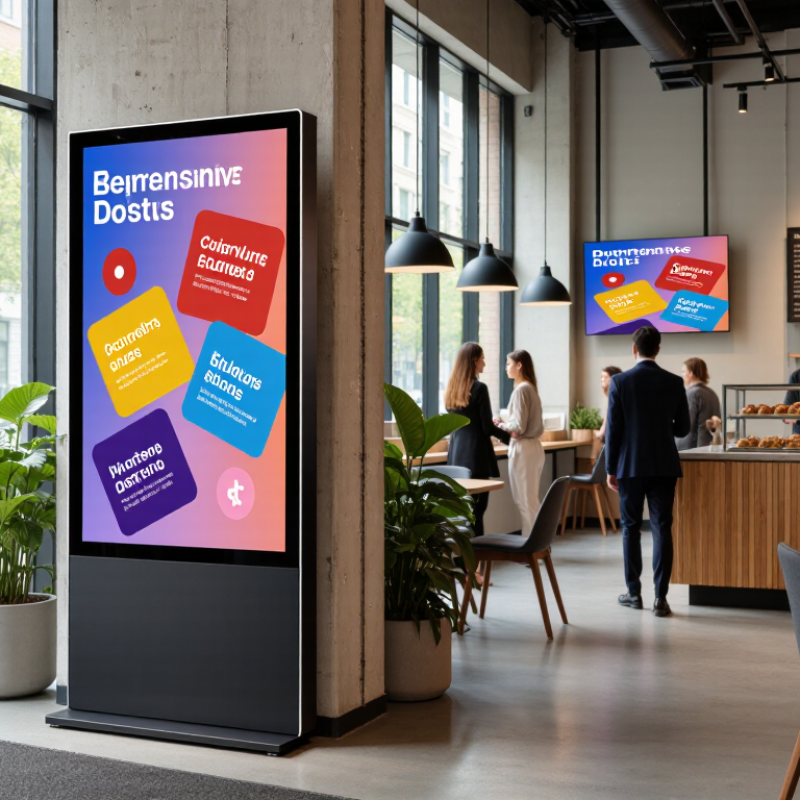
Digital display signage uses electronic screens to show changing information, images, or video in a physical location. A typical setup includes a screen, a media player, and software for preparing and scheduling content. The player sends the selected files to the screen. It may connect to the software over a network, or store content locally for playback when the connection drops. Nothing mysterious.
For example, a café might schedule breakfast menus for the morning and a different offer for the afternoon. Staff create the content, choose which screen should show it, and set a playback time. The system then updates the display, either remotely or through a local connection. Screen size, brightness, viewing distance, and update frequency all affect how clear and useful the message feels. A bright screen near a sunny window may need different settings from one in a dim hallway. Technology alone does not make a message effective; cluttered slides can still be hard to read. This is easy to overlook.
Tips: Use large text, strong contrast, and one clear message per screen. Check the display from the distance customers will stand. Keep a manual update plan, too; networks can fail.
Retail stores use digital display signage for changing prices, promotions, and wayfinding near busy aisles. A screen beside a bakery can show today’s bread, while a display at checkout highlights a short seasonal offer. Arbitron’s 2006 Digital Video Displays study found that 70% of Americans had seen a video display in a public venue during the previous month. In that survey, 19% said a display had prompted an unplanned purchase. The figures are useful context, not a current guarantee; viewing habits have changed.
Restaurants can update menus as items sell out, and hotels can direct guests from the lobby to meeting rooms. Transit hubs use screens for platform changes and service notices, where timing matters more than decoration.
In clinics, clear queue updates may reduce uncertainty, though screens should never replace staff guidance. Workplaces also use them for room schedules and safety reminders. Keep messages readable from a few steps away. That matters.
AVIXA’s Digital Signage End-User Survey has tracked adoption across settings, but the practical lesson is local: placement and content must fit each audience. A screen can be bright and still be ignored. Check whether people actually notice it.
Digital display signage helps businesses share timely information where customers make decisions.
A café can show today’s soup, allergen details, and pickup instructions near the counter.
A clinic can explain check-in steps while visitors wait.
Clear visuals may reduce repeated questions and give staff more time for personal support.
Give each screen one clear purpose. Use readable type, strong contrast, and plain language; place key details where customers can see them. Update prices, hours, and service notices promptly, and assign someone to check them.
Outdated information can weaken trust. A screen is not a conversation by itself. Some customers still need spoken help, and crowded layouts can confuse rather than guide.
Ask staff which questions keep coming up, then adjust the messages. Small changes matter.
Tips:
Keep each screen focused on one task. Use short phrases. Add a clear next step, such as “Ask at the desk.” Check readability from the customer’s usual viewing distance. If the message feels unclear to staff, it may confuse visitors too.
Digital signage costs extend well beyond the screen. A 500-watt display running 12 hours daily uses about 2,190 kilowatt-hours a year, before cooling and standby power. The U.S. Energy Information Administration reported an average commercial electricity price of about 12.7 cents per kilowatt-hour in 2023. At that rate, the example screen costs roughly $278 yearly to run. Actual consumption varies with brightness, operating hours, and content. Check the manufacturer’s typical power draw, not just its peak rating.
Installation can add cabling, mounting, network access, and a technician’s time. Budget for downtime. Grand View Research estimated the global digital-signage market at $28.83 billion in 2023, but market growth does not guarantee a return for an individual shop. Compare the full cost with a specific use, such as updating daily menus without reprinting. Also price content creation, software subscriptions, repairs, and eventual screen replacement. A bright storefront display may need more power and weather protection than one in a quiet lobby. Get written quotes that separate hardware, installation, and recurring fees. Estimates can still miss small costs, like moving a power outlet; check the site before approving a budget.
Indicative U.S. one-time setup cost ranges per screen
Digital signage makes it easier to update messages without reprinting signs and can help businesses keep promotions and information current. These broad planning ranges vary with screen size, brightness, equipment, location, and labor; they exclude content software, electricity, connectivity, and ongoing maintenance. Check indoor or outdoor suitability, network access, content-update needs, and service requirements before choosing a system.
Why Choose Digital Display Signage for Your Business?
How to Choose and Manage a Digital Signage System
Choosing a digital signage system starts with the job it must do. A menu board needs quick updates and readable text; a lobby display may need scheduled messages across several screens. Grand View Research valued the global digital signage market at USD 28.83 billion in 2024 and forecasts 8.1% annual growth from 2025 to 2030. That signals growing investment, not guaranteed results for every business. Set a clear goal, such as reducing printed menu changes or sharing daily store updates, before comparing equipment. Check screen brightness, operating hours, network reliability, accessibility, and who will maintain the system. A low purchase price can hide costs for installation, software, and support.
Tips: Test one screen in its real location. Check glare at noon, text visibility from the entrance, and whether staff can update content without technical help. Keep a simple publishing calendar, assign an owner, and review outdated messages weekly. Track a practical measure, such as update time or customer questions. Small pilot first.
One detail is easy to overlook: content maintenance takes time. A screen with stale promotions can weaken trust, even when the hardware works well. Document login access and backup steps, then train at least one alternate staff member. The system may still need occasional troubleshooting; plan for it rather than assuming it will run itself.
| Decision Area | What to Evaluate | Practical Guideline | Management Action |
|---|---|---|---|
| Business objective | The specific job the screens need to do, such as displaying schedules, wayfinding, promotions, or service updates. | Define one primary objective and a measurable outcome before selecting equipment or software. | Track a relevant measure, such as message accuracy, customer inquiries, or campaign response. |
| Screen location and environment | Viewing distance, ambient light, operating hours, mounting position, and whether the display is indoors or outdoors. | Match screen brightness, enclosure, and operating specifications to the actual installation environment. | Document each screen’s location, model, orientation, power source, and environmental requirements. |
| Resolution and layout | Screen resolution, aspect ratio, text size, image quality, and whether the content is landscape or portrait. | Full HD is 1920 × 1080 pixels; 4K UHD is 3840 × 2160 pixels. Prepare content in the display’s native resolution and orientation. | Preview content on the actual screen and check legibility from the intended viewing distance. |
| Content management | Scheduling, remote publishing, reusable templates, approval workflows, and support for the required media formats. | Confirm that authorized staff can update content remotely and that scheduled items use the correct time zone. | Assign content owners, review dates, and approval responsibilities for each screen group. |
| Network and playback | Internet availability, device connectivity, local playback, and how the system handles a network interruption. | Check whether players can cache approved content and continue playback during a temporary connection loss. | Test connectivity at the installation site and monitor device status after deployment. |
| Security and access | User permissions, account security, software updates, and protection of the network-connected players. | Use individual accounts, least-privilege access, strong authentication, and a documented update process where supported. | Review access regularly and remove accounts when staff no longer need them. |
| Accessibility and readability | Contrast, text size, reading time, color use, and whether essential information is understandable without sound. | Use clear language, strong text-to-background contrast, and captions for meaningful spoken content. | Check content on-screen in its real environment and avoid relying on color alone to communicate meaning. |
| Reliability and maintenance | Warranty, support response, replacement process, monitoring tools, and expected maintenance tasks. | Set an internal availability target based on business needs; define how outages will be detected and escalated. | Keep an inventory and maintenance log, and test screens and players on a regular schedule. |
| Pilot and performance review | Whether the chosen setup works for real users, content workflows, network conditions, and operating costs. | Test a small number of screens before expanding; compare results with the objective defined at the start. | Review performance, staff feedback, and total operating costs, then refine the rollout plan. |
Note: Practical guidelines are starting points; confirm equipment, accessibility, safety, and network requirements for each installation.

